Early release for Mac
Mail that keeps up with you.
Tourmaline is a native mail app for Mac. It stays fast with a hundred thousand messages, works offline, puts every action a key or ⌘K away, and keeps what you read to yourself.

Fast
Built native, measured on a big mailbox.
Swift, SwiftUI and AppKit, with your mail in a local database. Lists, search and actions answer from this Mac first; the network catches up in the background.
- from launch to your Inbox, with 100,000 messages
- 0.29 s
- from a keystroke to search results
- ≈0.1 s
- late frames scrolling through 3,000 conversations
- 0
- of memory after launch, same mailbox
- 65–93 MB
Measured on version 0.3.8, on an Apple silicon Mac with an optimized build and 100,000 generated messages, median of three runs; launch from a cold start. Search: 85–115 ms per keystroke, 0.21–0.26 s for the first one after launch.
Keyboard-complete
Every action, a key or ⌘K away.
Single keys for everything you do all day, CommandK for everything else, and ? to see them all. Single keys never fire while you type.
- jknext, previous
- earchive
- rreply
- hsnooze
- /search
- gigo to Inbox
- zundo
- CommandReturnsend

Calm inbox
Decide once. Tourmaline remembers.
Tools that keep the Inbox for the mail that matters, all on your Mac.
Screener
Turn it on, and mail from someone new waits in the Screener until you allow or block the sender, with one key.
Split Inbox
Turn it on for Important, Newsletters and Notifications in their own sections, each with Archive All and one Undo.
Snooze and send later
Put a conversation away until later today, tomorrow or a date you pick; write now and send when it suits them.
Remind me if no reply
Tourmaline brings a sent message back if nobody has answered by the time you chose.
Mute
A thread you're done with stays out of the Inbox, however many replies it gets.
Rules
Sort new mail by sender, subject, list or attachment; on servers with ManageSieve they can run on the server too.

Search
Finds it even when you misspell it.
Results appear as you type, from the mail on this Mac. Typos and missing accents still match, best matches come first, and filters like from:, has:pdf or older_than:2w turn into chips.
amaznfinds Amazon;perchefinds “perché”- Search the server too for older mail, with ShiftReturn

Private
Your mail stays between you and your mail server.
No Tourmaline account, no server of ours in the middle, no analytics. Read the privacy policy.
Trackers blocked
Remote images and pixels don't load until you allow them, per message or per sender. Messages render with JavaScript off.
No telemetry
Tourmaline sends no analytics and no crash reports. The only server of ours it talks to is the update feed.
Keychain only
Passwords and sign-in tokens live in your Mac's Keychain, never in logs.
Sender checks
A clear warning when a message fails DMARC, SPF or DKIM, or its display name doesn't match the address.
Masked addresses
Create an alias per site with SimpleLogin, addy.io or Fastmail, and reply from it without revealing your address.
Signed and encrypted mail
Read and send S/MIME and OpenPGP mail, with keys you generate, import and verify in the app.
Light and dark
Newsletters look the way they were designed.
Plain mail follows your appearance. Designed mail keeps its own colors, in dark mode too when the sender made a dark version, and one click shows it the other way.
- Calendar invitations you can answer in place
- Attachments preview right in the reader
- One-click unsubscribe

Mac, then iPhone
Made for the Mac. iPhone and iPad are next.
Tourmaline runs on macOS 15 or later, in English and Italian, and fits into the system: Spotlight, Shortcuts and Siri, the Share menu, notifications you can reply to, and the default mail app setting. An iPhone and iPad app built on the same core is in development and not available yet.
Works offline
Read what's on your Mac anywhere. Archive, reply and file without a connection; it all goes out when you're back.
Any IMAP account
Type your address and Tourmaline finds the settings for most providers, or enter them by hand. Several accounts, one unified Inbox.
Undo, everywhere
Undo send, and undo any archive, move or delete with z or CommandZ.

Try Tourmaline on your Mac.
It checks for updates once a day and asks before installing them.
First launch: one extra click, once
Tourmaline isn't notarized by Apple yet (that needs a paid Apple Developer membership, which is on its way), so macOS asks you to confirm the first time you open it. After that it opens like any other app, and its updates are signed and checked by the app before they install.
- Open the downloaded disk image and drag Tourmaline to Applications.
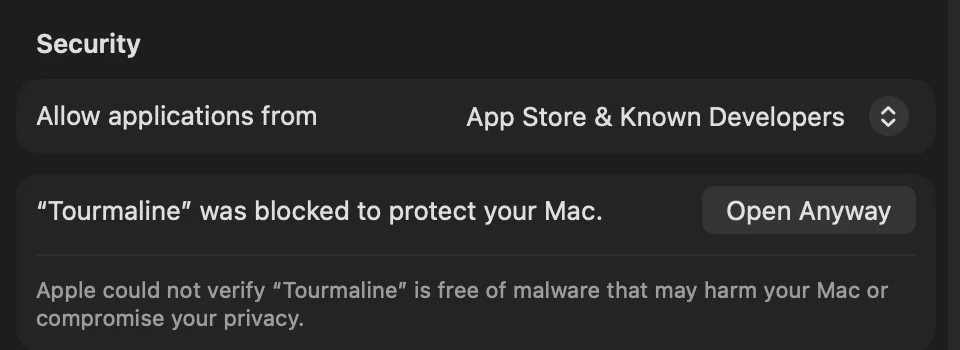
- Open Tourmaline. macOS says it could not verify it: click Done.
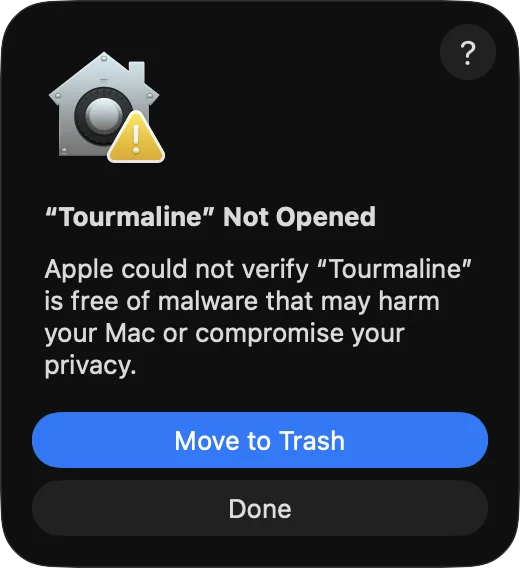
- Open System Settings → Privacy & Security, scroll down to Security and click Open Anyway next to “Tourmaline” was blocked. Choose Open Anyway again in the dialog that follows, and confirm with your password or Touch ID. The button shows for about an hour after you tried to open the app; if it's gone, open Tourmaline again first.